
Loading Tutorstips...

The topic Advance Excel Shortcut Keys will be very easy to understand if you have learnt our previous articles of excel shortcuts (Excel Shortcut keys for beginner and Excel Shortcut keys for Intermediates). Now we will explain another 10 shortcut keys to speed up your working and this is the last group of shortcut key after learning that article you will be able to do you work very fluently.
Please Note: - Practice a lot. If you want to be very fluent then stop using the mouse and use this shortcut key while working in the excel.
Download the PDF file of all advance Excel shortcut keys from the following link: -
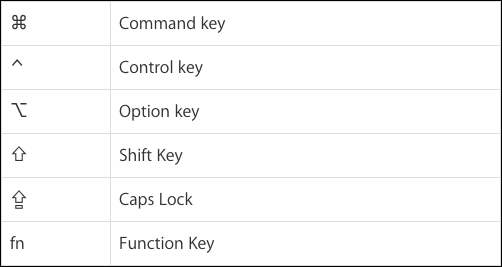
| Command to | Window shortcut | Mac Shortcut |
|---|---|---|
| Create New Workbook | Ctrl + N | Command Key + N |
| Open already saved a workbook | Ctrl + O | Command Key + O |
| Close opened workbook | Ctrl + F4 | Command Key + W |
| Close Excel | Alt + F4 | Command Key + Q |
| Command to | Window shortcut | Mac Shortcut |
|---|---|---|
| Move to Next in Ribbon Control | TAB | TAB |
| Move to previous in Ribbon Control | Shift + TAB | Shift Key + TAB |
| Command to | Window shortcut | Mac Shortcut |
|---|---|---|
| Apply and Remove the Filter | Ctrl + Shift + L | Command Key + Shift + F |
| Open Selected cell filter option | Alt +  |
Option Key + |
| Select option or Checkbox within the filter options | Space Key | Space Key |
| Command to | Window shortcut | Mac Shortcut |
|---|---|---|
| Insert Table in the Selected cell | Ctrl + T | Control Key + T |
| Select Table Row | Shift + Space Key | Shift Key + Space Key |
| Select Table Column | Ctrl + Space Key | Ctrl + Space Key |
| Insert "Total Row" in a table | Ctrl + Shift + T | Command Key + Shift Key + T |
| Command to | Window shortcut | Mac Shortcut |
|---|---|---|
| Drag and Cut cell value | drag with mouse and drop where you want to paste | drag with mouse and drop where you want to paste |
| Drag and Copy cell value | Ctrl + Drag | Option Key + Drag |
| Drag and Insert cell value | Shift + Drag | Shift Key + Drag |
| Drag and Insert Copy cell value | Ctrl + Shift + Drag | Option Key + Shift Key +Drag |
| Drag and Cut worksheet | drag with mouse and drop where you want to paste | drag with mouse and drop where you want to paste |
| Drag and Create duplicate Worksheet | Ctrl + Drag | Option Key + Drag |
| Command to | Window shortcut | Mac Shortcut |
|---|---|---|
| Select active cell | Shift + Backspace | Shift key + Delete |
| Show active cell | Ctrl + Backspace | Command key + Delete |
| Cancel selection | Esc | Esc |
| Command to | Window shortcut | Mac Shortcut |
|---|---|---|
| Select Direct Precedent | Ctrl + [ | Control key + [ |
| Select All Precedent | Ctrl + Shift + { | Control key + Shift key + { |
| Select Direct Dependent | Ctrl + ] | Control key + ] |
| Select All Dependent | Ctrl + Shift + } | Control key + Shift key + } |
| Command to | Window shortcut | Mac Shortcut |
|---|---|---|
| Display "Go-To" Dialog Box | Ctrl + G | Control key + G |
| Select All cell with comments | Ctrl + Shift + O | Control key + Shift key + O |
| Select the visible cell only | Alt + ; | Command key + Shift Key + Z |
Advance Excel Shortcut Keys - No. 8
| Command to | Window shortcut | Mac Shortcut |
|---|---|---|
| Edit Active Cell | F2 | Control key + U |
| Insert or Edit comments | Shift + F2 | Fn + Shift key + F2 |
| Start a new line in the same cell | Alt + Enter | Control key + Option Key + Return |
| Command to | Window shortcut | Mac Shortcut |
|---|---|---|
| Select one character Right within the active cell | Shift +  |
Shift key + |
| Select one character Left within the active cell | Shift +  |
Shift key + |
| Select one word Left within the active cell | Ctrl + Shift + |
Control key + Shift Key + |
| Select one word Right within the active cell | Ctrl + Shift + |
Control key + Shift Key + |
| Only move one word from left to right | Ctrl + |
Control key + |
| Only move one word from Right to Left | Ctrl + |
Control key + |
| Select from end to beginning | Shift + Home | Fn + Shift Key + |
| Select from beginning to end | Shift + End | Fn + Shift Key + |
Thanks for reading the topic of "Advance Excel Shortcut Keys".
Please Share and comment your feedback in the comment box.
to buy the Microsoft Excel Click Here.
Accounting & Commerce Educator
Sarbjit Singh holds a B.Com and M.Com degree and has over 12 years of teaching experience in double entry bookkeeping, financial accounting, and business studies.
The topic Advance Excel Shortcut Keys will be very easy to understand if you have learnt our previous articles of excel shortcuts ( Excel Shortcut keys for…
Class 11 and Class 12 commerce students, and CA Foundation aspirants, studying Excel Shortcuts.
Yes — this page includes a short interactive quiz so you can check your understanding straight away.